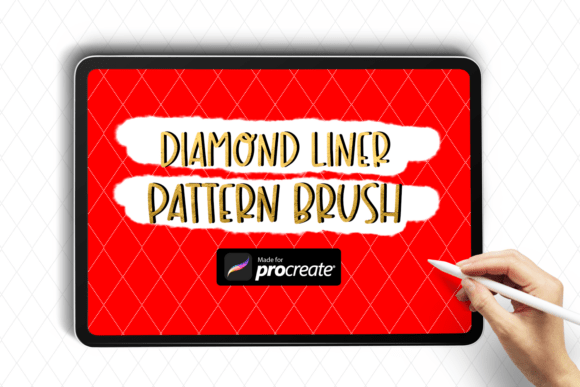
Diamond Liner Pattern Procreate Brush
Enhance Your Digital Art with a Touch of Elegance
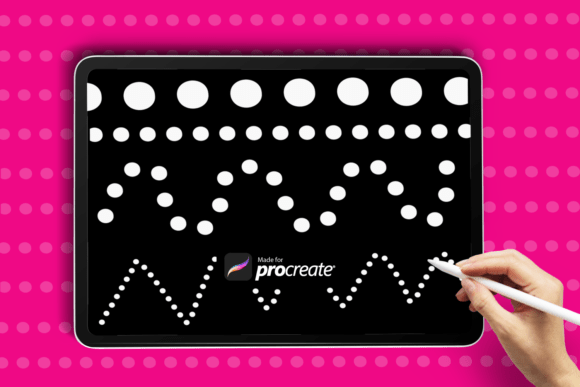
Adding a refined, luxurious detail to digital illustrations can elevate your work from good to exceptional. The Diamond Liner Pattern Procreate Brush is a versatile tool designed to bring a sparkling, high-end finish to your creative projects. Whether you're working on fashion sketches, wedding invitations, or digital borders, this brush helps you achieve a polished look with minimal effort.
Unlike standard brushes that require repetitive detailing, the Diamond Liner Pattern Brush automatically generates a seamless diamond motif with every stroke. This eliminates the need for manual drawing of individual shapes, saving you time while maintaining a consistent, elegant design.
What Makes the Diamond Liner Pattern Brush Stand Out?
The Diamond Liner Pattern Procreate Brush is more than just a decorative tool—it's a functional asset that enhances both the visual appeal and efficiency of your workflow. Here are some of its standout features:
- Seamless Pattern Generation: The brush creates a continuous diamond line with every stroke, ensuring a clean, professional look without the hassle of drawing each shape manually.
- Sleek Linear Flow: Designed for smooth application, it maintains a clean, linear path that adapts well to curves and sharp angles alike.
- Versatile Use: Ideal for borders, fashion designs, digital illustrations, and branding elements, this brush adapts easily to a variety of creative needs.
- Procreate-Optimized Performance: Built specifically for the Procreate app, it integrates seamlessly into your digital workflow without lag or inconsistency.
Practical Applications Across Creative Fields
From personal art projects to professional branding, the Diamond Liner Pattern Procreate Brush offers a wide range of applications. Here’s how different users can benefit from incorporating it into their work:
For Designers and Illustrators
Graphic designers and illustrators can use the brush to add ornamental touches to editorial illustrations, fashion flats, or packaging designs. The diamond pattern works especially well for luxury branding, gift cards, and high-end product visuals.
For Wedding and Event Designers
Wedding invitation designers often seek elegant embellishments that communicate sophistication. The Diamond Liner Brush can be used to frame invitation suites, add delicate borders to RSVP cards, or highlight key design elements with a subtle sparkle.
In Educational and Digital Content Creation
Educators and content creators can use the brush to enhance digital presentations, infographics, and tutorial materials. A touch of elegance in visual layouts can improve engagement and readability, especially when presenting to professional or creative audiences.
For Entrepreneurs and Marketers
Entrepreneurs building personal brands or launching product lines can incorporate the brush into social media templates, digital ads, and branded stationery. The diamond motif subtly communicates quality and refinement, aligning well with premium positioning.
How to Use the Diamond Liner Pattern Brush in Procreate
Using the Diamond Liner Pattern Procreate Brush is simple and intuitive. Once installed, it functions like any other brush in your toolkit, with the added benefit of built-in pattern generation.
- Download the ZIP folder containing the .brush file.
- Extract the file on your iPad.
- Open the “Files” app and locate the extracted .brush file.
- Tap the file to import it directly into Procreate.
- Select the brush from your brush library and start creating.
Because the brush generates a continuous pattern as you draw, there’s no need to layer or repeat strokes manually. This makes it ideal for both beginners and experienced artists who want to streamline their process.
Design Tips for Maximum Impact
- Use it for framing: Apply the brush along the edges of digital canvases to create elegant borders that enhance the overall composition.
- Layer for depth: Combine the diamond line with other textures or gradients to create a multidimensional effect without cluttering the design.
- Adjust brush size: Vary the brush size to suit your project—use a thin line for subtle accents or a bold stroke for dramatic borders.
- Experiment with color: While the brush works beautifully in gold or silver tones, don’t be afraid to use it in unexpected colors to match your brand or theme.
Why It Belongs in Your Creative Toolkit
In the fast-paced world of digital design, tools that combine efficiency with aesthetic value are invaluable. The Diamond Liner Pattern Procreate Brush offers both, making it a smart addition for creators who want to add a touch of class without compromising workflow speed.
Its ability to generate clean, continuous patterns with a single stroke means less time spent on repetitive detailing and more time focusing on the creative vision. Whether you're working on a client project, personal portfolio piece, or social media content, this brush helps your work stand out with a polished, professional finish.
Final Thoughts
If you're looking to add sophistication to your digital art without complicating your process, the Diamond Liner Pattern Procreate Brush is a worthwhile investment. Its seamless design, intuitive functionality, and wide range of applications make it a versatile tool for both casual creators and professional designers.
By integrating this brush into your Procreate workflow, you not only enhance the visual quality of your work but also streamline your creative process—allowing you to focus more on your ideas and less on technical execution.