Lovely Garden Procreate Color Palette: A Creative Essential for Digital Artists
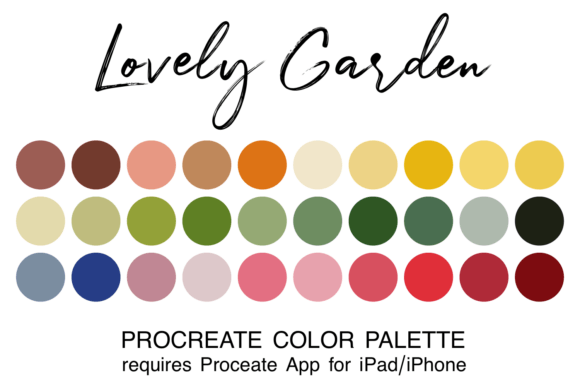
If you're a digital artist, designer, or illustrator using Procreate, you know how crucial it is to work with a cohesive color scheme. The Lovely Garden Procreate Color Palette is a vibrant, nature-inspired collection that brings the lush beauty of the outdoors right into your digital canvas. With 30 carefully selected hues ranging from soft florals to deep earth tones, this palette is a must-have for anyone looking to create artwork that feels organic, calming, and visually rich.
What Makes the Lovely Garden Palette Stand Out?
Unlike generic color sets, the Lovely Garden Procreate Color Palette is thoughtfully curated to reflect the natural harmony found in blooming gardens and serene landscapes. Each color blends effortlessly with the others, making it easy to create cohesive compositions without the stress of mixing incompatible tones.
- Earthy Neutrals: From soft moss greens to warm terracotta, these foundational tones provide depth and grounding.
- Vibrant Botanicals: Think blooming peonies, sunlit citrus, and tropical foliage—perfect for adding life and energy.
- Soft Pastels: Ideal for backgrounds, subtle highlights, or dreamy illustrations.
Whether you're designing greeting cards, wall art, or digital illustrations, this palette ensures your work feels connected and intentional.
How to Install and Use the Palette in Procreate
For beginners, using custom color palettes might seem a bit technical, but with the Lovely Garden Procreate Color Palette, the process is straightforward. Once downloaded, you’ll receive a .swatch file that’s specifically formatted for Procreate. Here's how to install it:
- Download the zipped file to your iPad using the Files app.
- Unzip the folder and tap the .swatch file.
- The palette will automatically load into your Procreate app under the “Palettes” section.
Once installed, you can access it anytime, making it a seamless part of your creative workflow. No more guesswork or time spent mixing colors—just open your preferred brush, select a hue, and start creating.
Perfect for a Wide Range of Artistic Projects
One of the standout features of the Lovely Garden Procreate Color Palette is its versatility. It’s not limited to one specific style or project type. Here are just a few creative applications where this palette shines:
- Print Design: Ideal for botanical-themed stationery, calendars, and greeting cards.
- Textile Art: Use it to design fabric patterns for quilting, apparel, or home décor.
- Digital Illustration: Whether you’re drawing portraits, landscapes, or fantasy scenes, these colors add warmth and realism.
- Social Media Graphics: Create visually cohesive Instagram posts, Pinterest boards, or Canva templates with a natural aesthetic.
Because the palette includes both bold and muted tones, you can easily adjust the mood of your piece—from vibrant and energetic to soft and calming—without needing to switch palettes.
Why Digital Artists Love Curated Palettes
Creating art in Procreate becomes significantly more efficient and enjoyable when you have a well-designed palette like Lovely Garden at your fingertips. Instead of spending time searching for the perfect shade or adjusting RGB values manually, you can focus entirely on your composition and brushwork.
Curated palettes also help maintain consistency across your body of work. If you're building a brand, designing a book, or working on a series, having a unified color scheme ensures your visuals remain cohesive and professional.
Enhancing Your Creative Workflow
In today’s fast-paced creative world, efficiency is key. The Lovely Garden Procreate Color Palette streamlines your digital painting process by eliminating the guesswork involved in color selection. This is especially beneficial for artists who work on tight deadlines or produce content regularly for clients or personal projects.
Moreover, the natural inspiration behind the palette encourages a more intuitive approach to color blending and layering. You can easily build depth and dimension in your work by stacking lighter pastels over darker bases or using complementary tones for contrast.
Designing with Nature in Mind
There’s a reason nature-inspired palettes are so popular—they resonate with people on a deep emotional level. The colors found in gardens, forests, and meadows evoke feelings of peace, nostalgia, and vitality. By incorporating the Lovely Garden Procreate Color Palette into your work, you tap into these universal emotions, making your art more relatable and engaging.
For example, if you're illustrating a children’s book set in a magical forest, the palette’s earthy greens and floral pinks can bring the setting to life. If you're creating a logo for a wellness brand, the soothing tones can communicate calm and balance.
Who Should Use the Lovely Garden Palette?
This palette is ideal for a variety of users, including:
- Illustrators: Especially those working on nature-themed or botanical art.
- Surface Pattern Designers: Perfect for creating repeat patterns with a soft, organic feel.
- Art Journalers: Great for adding depth and emotion to personal pages.
- Beginner Artists: Offers a foolproof way to explore color without overwhelming complexity.
If you're new to Procreate or digital art in general, starting with a curated palette like this one can be a confidence booster. It helps you understand color relationships and how to use them effectively in your designs.
Final Thoughts
The Lovely Garden Procreate Color Palette isn’t just another digital asset—it’s a creative companion that enhances your artistic expression and workflow. Whether you're painting a fantasy scene, designing a floral pattern, or sketching a peaceful landscape, this palette brings the beauty of nature directly to your iPad screen.
By simplifying the color selection process and offering a wide range of harmonious tones, it allows you to focus more on what truly matters: your art. So, if you're looking to elevate your digital creations with a touch of natural elegance, the Lovely Garden Procreate Color Palette is definitely worth adding to your toolkit.