Understanding Brush Stroke File Formats: EPS, SVG, PNG, and JPEG
Whether you're a graphic designer, a digital artist, or someone exploring the world of visual creativity, understanding the different file formats for brush strokes is essential. The terms EPS, SVG, PNG, and JPEG are more than just acronyms—they represent different ways of storing and using digital images, each with its own strengths and weaknesses. In this article, we'll break down what these file formats mean, how they're used, and why they matter when working with sets of brush strokes.
What Are Brush Strokes and Why Do File Formats Matter?
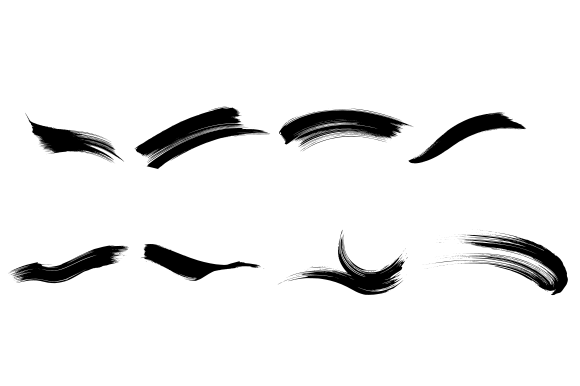
Brush strokes are digital representations of hand-drawn or stylized marks that mimic traditional painting or drawing techniques. Artists and designers often use pre-made sets of brush strokes to add texture, movement, or artistic flair to their work. These sets can be applied in software like Adobe Photoshop, Illustrator, or other design tools. However, the format in which these brush strokes are saved can significantly impact their usability, quality, and flexibility.
Choosing the right file format ensures that your brush strokes remain sharp, scalable, and adaptable across different platforms and design projects. Let's explore the most common formats used for brush stroke sets: EPS, SVG, PNG, and JPEG.
Vector vs. Raster: A Key Distinction
Before diving into specific file types, it's important to understand the difference between vector and raster graphics. This distinction plays a major role in determining which format is best for your brush stroke files.
- Vector formats (like EPS and SVG) use mathematical equations to define shapes and lines. This makes them infinitely scalable without loss of quality—perfect for logos, illustrations, and brush strokes that may need resizing.
- Raster formats (like PNG and JPEG) are made up of pixels. While they can display complex colors and gradients, they lose quality when enlarged beyond their original size.
EPS: Encapsulated PostScript
EPS is a vector-based file format commonly used in professional graphic design. It was developed by Adobe and is especially popular in print media. When you download a set of brush strokes in EPS format, you're getting a high-quality, scalable image that can be resized without losing clarity.
Pros of EPS:
- High resolution and scalable
- Compatible with most vector editing software like Adobe Illustrator
- Suitable for print and professional design
Cons of EPS:
- Larger file size compared to some other formats
- May not be supported by all web platforms or basic image viewers
- Can be more complex to edit without the right software
EPS files are ideal for designers who need high-quality brush strokes for print projects or detailed illustrations. However, they may not be the best choice for web-based or beginner-level design work.
SVG: Scalable Vector Graphics
SVG is a modern, web-friendly vector format that's gaining popularity due to its scalability and compatibility with web browsers. Like EPS, SVG files maintain their quality at any size, making them perfect for responsive web design and digital illustrations.
Pros of SVG:
- Fully scalable with no loss of quality
- Lightweight and compressible for web use
- Editable with code or design software
- Supported by most modern browsers and design tools
Cons of SVG:
- Not ideal for complex photographic images
- May require additional optimization for certain applications
SVG brush stroke sets are excellent for web designers, UI/UX professionals, and anyone creating digital artwork that needs to be both flexible and visually consistent across devices.
PNG: Portable Network Graphics
PNG is a raster format known for its lossless compression and support for transparency. It's widely used on the web and is especially useful for brush strokes that include soft edges or overlays.
Pros of PNG:
- Supports transparency and high color depth
- Lossless compression preserves image quality
- Easy to use in most image editing and design software
- Great for web graphics and overlays
Cons of PNG:
- Not scalable without quality loss
- Larger file sizes compared to JPEG for complex images
When working with PNG brush strokes, it's important to keep them at their original size or scale them down. They’re best suited for digital art, web design, and overlay effects where transparency and clarity are key.
JPEG: Joint Photographic Experts Group
JPEG is one of the most common image formats, especially for photographs. It uses lossy compression, which means some image data is discarded to reduce file size. While not ideal for all brush stroke sets, JPEG can be useful in certain contexts.
Pros of JPEG:
- Small file size due to compression
- Widely supported across devices and platforms
- Good for photographic or textured brush strokes
Cons of JPEG:
- Lossy compression reduces image quality
- No support for transparency
- Not scalable without visible degradation
JPEG brush strokes are typically used for backgrounds, textures, or effects where perfect clarity isn't essential. They’re less common for detailed or scalable brush sets but can still be valuable in certain creative workflows.
Which Format Should You Choose for Your Brush Strokes?
The best file format depends on how you plan to use your brush stroke set:
- For print and professional design: EPS or SVG
- For web and digital design: SVG or PNG
- For textures and backgrounds: JPEG or PNG
- For editing and flexibility: SVG or EPS
If you're unsure, many brush stroke packs come with multiple formats included, giving you the flexibility to choose the right one for each project.
Common Misconceptions About Brush Stroke File Formats
There are several misunderstandings about file formats that can lead to poor choices when selecting or using brush stroke sets. Here are a few to watch out for:
- All formats are interchangeable: While you can sometimes convert between formats, doing so may result in quality loss or missing features like transparency or scalability.
- Higher resolution always means better quality: Resolution matters, but it's not the only factor. A high-resolution JPEG is still a raster image and won't scale like an SVG.
- Any format works for web use: While most formats can be used online, SVG and PNG offer better performance and flexibility for web graphics.
How Brush Strokes Enhance Creativity Across Industries
Brush strokes aren't just for artists. They play a role in many creative and professional fields:
- Graphic Design: Adds texture and movement to logos, illustrations, and layouts.
- Web Design: Enhances UI elements with organic, hand-drawn effects.
- Photography: Used in photo editing for overlays, borders, and artistic effects.
- Education: Teachers and students use brush strokes to create engaging visuals and presentations.
- Marketing: Brands use brush strokes to add personality and uniqueness to promotional materials.
Understanding the right file format ensures that these brush strokes can be used effectively, no matter the industry or application.
Conclusion: Choosing the Right Tools for Your Creative Workflow
In the digital age, having the right tools means more than just having the latest software—it means understanding the formats that power your creative work. Sets of brush strokes in EPS, SVG, PNG, and JPEG each serve unique purposes, and knowing when to use them can make a big difference in the quality and efficiency of your designs.
Whether you're creating a logo, designing a website, or adding texture to a digital painting, take the time to consider which format best suits your needs. By choosing wisely, you’ll not only preserve the integrity of your brush strokes but also enhance your overall creative output.
So next time you download a brush stroke set, don’t just look at the design—check the file format. It might just be the difference between a good design and a great one.