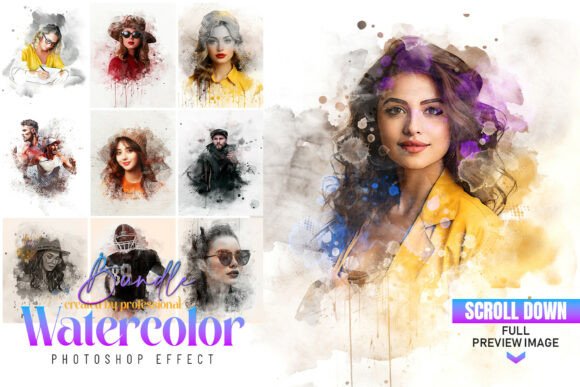
Transform Photos with Art Watercolor Effect Photoshop Action
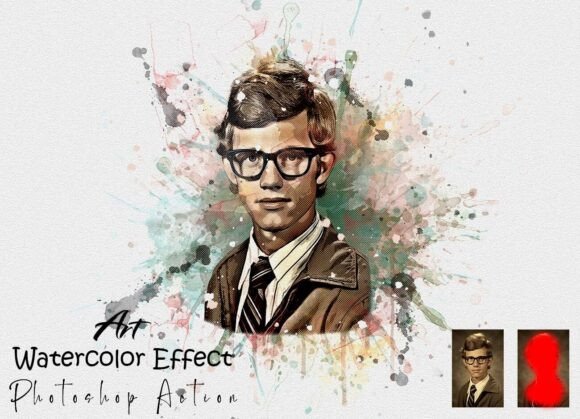
For photographers, designers, and content creators, achieving a painterly, artistic look can elevate visual storytelling. The Art Watercolor Effect Photoshop Action offers a streamlined way to convert digital images into beautifully stylized watercolor interpretations. Whether you're enhancing a portfolio, preparing visuals for a blog post, or designing marketing materials, this Photoshop Action provides a professional-grade tool that simplifies creative post-processing.
Unlike manual editing, which requires advanced skills and time, this action automates complex layer adjustments, brush strokes, and texture overlays. It’s ideal for users who want to maintain creative control without starting from scratch. With a few clicks, you can apply a refined watercolor aesthetic that mimics traditional painting techniques—perfect for those who want expressive visuals without the learning curve of advanced Photoshop techniques.
How It Works and Why It Saves Time
Once installed, the Art Watercolor Effect Photoshop Action integrates directly into your Photoshop workspace. The process begins by resizing your image using the Crop Tool to W 3000px x H 2000px at 72 resolution—a standard dimension that balances quality and file size for digital use. Then, a new layer named “paint” is created, allowing you to highlight your subject using a soft brush before triggering the action. This selective approach ensures the effect enhances the intended focal point without overwhelming the entire image.
This workflow dramatically reduces the time needed to achieve artistic results. Instead of manually painting textures or adjusting layer blending modes, the action automates these steps while preserving the ability to fine-tune results. It’s especially useful for batch processing multiple images with consistent styling, such as preparing a gallery of portraits or product shots for a creative website or social media feed.
Who Benefits Most from This Photoshop Action?
Photographers looking to add a handcrafted touch to portraits, weddings, or lifestyle imagery will find this action particularly valuable. Designers working on editorial layouts, book covers, or greeting cards can use it to quickly generate soft, artistic visuals that stand out. Bloggers and content creators aiming to differentiate their aesthetic from standard photo filters can apply the effect to images for a unique, painterly style that aligns with their brand identity.
Small business owners and marketers can also benefit by using the action to create visually engaging promotional materials, social media graphics, or product visuals that evoke a sense of artistry and sophistication. Even those without Photoshop experience can follow the included user guide and video tutorial to achieve professional results, making it accessible to a wide range of users.
High Quality and Customizable Output
The Art Watercolor Effect Photoshop Action delivers high-resolution results suitable for both digital and print applications. The included brush set and layered structure allow for easy customization—whether you want to intensify the brush strokes, adjust color tones, or blend multiple effects. This flexibility ensures that each project can be tailored to specific creative goals while maintaining a cohesive visual style.
Each action-generated file maintains organized layers, making it simple to revisit and edit individual components. This level of control is especially helpful for professionals who may need to tweak visuals after client feedback or repurpose images for different platforms without starting over.
Easy Setup and Support
Installation is straightforward: simply load the ATN file into Photoshop, and the action appears in your Actions panel. The package includes a PDF help file and a video guide link, ensuring that even first-time users can navigate the setup and application process with confidence. Should any issues arise, 24-hour support is available to help troubleshoot installation or usage questions.
This ease of use makes the Art Watercolor Effect Photoshop Action a practical addition to any creative workflow, especially for users who want to focus more on content creation and less on technical setup.
Real-World Applications and Creative Uses
Imagine transforming a standard product photo into a soft, artistic representation for a boutique website or converting a family portrait into a personalized wall art piece. The action works across a wide range of subjects—people, landscapes, still life—making it versatile for different visual needs.
Educators can use it to create engaging visual materials for presentations or online courses. Freelancers can offer enhanced editing services by incorporating the effect into their deliverables. Even hobbyists looking to experiment with digital art can explore new creative possibilities without deep Photoshop expertise.
Considerations and Best Practices
While the Art Watercolor Effect Photoshop Action is designed to work with most images, results may vary depending on the original photo's composition, lighting, and subject matter. High-contrast images with clear focal points tend to yield the best results, as the effect enhances defined areas more effectively.
Users should also be aware that while the action streamlines the process, achieving the desired outcome may require some experimentation. Adjusting layer opacity, color balance, or brush intensity after the action runs can help refine the final look. It's also recommended to keep a backup of the original file before applying any effects.
Final Thoughts
The Art Watercolor Effect Photoshop Action is more than just a filter—it's a creative tool that empowers users to explore artistic expression efficiently. Whether you're a professional designer looking to streamline your workflow or a beginner wanting to create stunning visuals, this action offers a practical way to enhance your images with a painterly finish. With its compatibility across multiple Photoshop versions and ease of use, it's a valuable asset for anyone invested in visual storytelling and creative design.