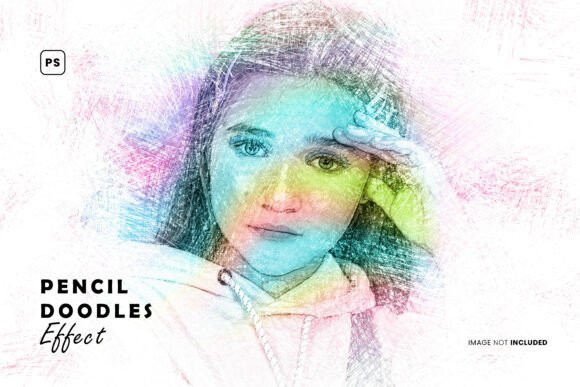
Transform Your Photos into Art with the Pencil Doodles Photo Effect
Are you looking for a creative and charming way to enhance your digital images? The Pencil Doodles Photo Effect might be exactly what you need. This unique Photoshop add-on allows you to turn ordinary photos into whimsical, hand-drawn masterpieces with just a few clicks. Whether you're a graphic designer, illustrator, or photography enthusiast, this effect opens up a world of artistic possibilities. In this article, we’ll explore what the Pencil Doodles Photo Effect is, how it works, and why it’s a must-have tool for modern digital creators.
What Is the Pencil Doodles Photo Effect?
The Pencil Doodles Photo Effect is a premium Photoshop resource that overlays hand-drawn pencil doodles onto your images. It comes in a high-resolution PSD format, allowing for full customization. Designed with ease of use in mind, this effect mimics the look of real pencil sketches and doodles, giving your photos a playful and artistic vibe.
Each file is layered and organized, making it simple to adjust elements like doodle size, placement, and opacity. This level of control ensures that you can tailor the effect to suit your specific project needs, whether you're working on a poster, social media post, or personal artwork.
Why Use the Pencil Doodles Photo Effect?
There are countless photo effects available online, so what makes this one stand out? Here are a few reasons why the Pencil Doodles Photo Effect is a valuable addition to your creative toolkit:
- Artistic Flair: This effect adds a unique, hand-crafted aesthetic that can make your images stand out in a sea of digital content.
- Time-Saving: Instead of manually drawing doodles or sketches over your images, this effect streamlines the process into just a few steps.
- Versatility: It works well across a wide range of projects, including marketing materials, personal blogs, and creative portfolios.
- Customizability: With smart object replacement layers, you can easily tweak the look and feel of the doodles to match your vision.
How Does the Pencil Doodles Photo Effect Work?
The Pencil Doodles Photo Effect is built using Smart Objects in Adobe Photoshop, which means you can edit your base image without losing quality. Here’s a simple breakdown of how to use it:
- Open the PSD file in Photoshop.
- Double-click on the Smart Object layer to replace the sample image with your own.
- Adjust layers to control doodle size, opacity, and positioning.
- Save and export your enhanced image in your preferred format.
Thanks to its well-organized layer structure, even beginners can achieve professional results without needing advanced Photoshop skills.
What's Included in the Pencil Doodles Photo Effect Package?
When you download the Pencil Doodles Photo Effect, you'll receive a comprehensive package that includes:
- High-resolution PSD files (4500 x 3000 pixels at 300 DPI)
- Smart Object layers for easy editing
- Organized and labeled layers for intuitive navigation
- JPG preview images for quick reference
- A ReadMe.txt file with instructions and tips
Please note that any images used in the preview files are for presentation purposes only and are not included in the download package.
Who Can Benefit from Using This Effect?
The Pencil Doodles Photo Effect is ideal for a wide range of creative professionals and hobbyists, including:
- Graphic designers who want to add a hand-drawn touch to their client projects.
- Illustrators looking to blend traditional and digital art styles.
- Photographers aiming to offer unique, stylized versions of their work.
- Social media creators who want to stand out with eye-catching, artistic visuals.
- Bloggers and content creators seeking to add personality to their digital content.
Whether you're designing a poster, updating your portfolio, or creating content for Instagram, this effect can help elevate your visuals with minimal effort.
How to Make the Most of the Pencil Doodles Photo Effect
Here are a few tips to help you get the best results from this creative tool:
- Experiment with Opacity: Lowering the opacity of the doodle layers can create a more subtle, integrated look.
- Layer Multiple Effects: Combine the pencil doodles with other Photoshop filters or textures for a more complex artistic style.
- Customize Smart Objects: Use your own doodle graphics or hand-drawn elements by replacing the default Smart Objects.
- Use High-Resolution Images: For the best results, apply the effect to sharp, high-quality source photos.
- Match the Style to Your Brand: Choose doodle placements and themes that align with your overall visual identity.
Real-World Applications of the Pencil Doodles Photo Effect
Let’s explore a few practical examples of how this effect can be applied in real projects:
- Event Posters: Use the effect to create vintage-style posters with a hand-drawn charm that appeals to art lovers and event attendees.
- Children’s Book Illustrations: Blend photos with doodles to create whimsical illustrations that engage young readers.
- E-commerce Product Images: Give your product visuals a creative edge that sets your brand apart from competitors.
- Wedding Invitations: Personalize your invites with artistic photo effects that reflect the couple’s personality.
- Personal Art Projects: Turn your favorite photos into framed art pieces with a unique, sketch-like finish.
Common Misconceptions About the Pencil Doodles Photo Effect
Some people may assume that using a pre-made Photoshop effect limits creativity or produces generic results. However, the Pencil Doodles Photo Effect is designed to be a starting point — not a final destination. Its fully customizable layers allow you to tweak and personalize the effect to match your unique style. Think of it as a digital canvas that you can paint over with your own creative choices.
Another common misconception is that such effects are only for beginners. On the contrary, even experienced designers appreciate tools that streamline their workflow while offering room for artistic experimentation. The time saved using this effect can be redirected toward refining other aspects of your design or exploring new creative ideas.
Conclusion: Why You Should Try the Pencil Doodles Photo Effect Today
In today’s fast-paced digital world, standing out creatively is more important than ever. The Pencil Doodles Photo Effect offers a quick, effective, and customizable way to add charm and personality to your images. With its high-resolution quality, smart object support, and user-friendly design, this tool empowers both novice and professional creators to produce stunning visual content with ease.
Don’t waste time trying to recreate this effect manually. With just a few clicks, you can transform your photos into captivating pieces of art. Whether you're designing for business, pleasure, or personal expression, the Pencil Doodles Photo Effect is a powerful resource that deserves a place in your creative toolkit.
If you enjoyed this effect, be sure to explore other related tools and resources. You might find something even more inspiring! 🙌